用户注册和登录
register & Login
- 目的
-
掌握本地存储的使用掌握UI常见的API进一步熟悉数据绑定的使用进一步熟悉表单元素的事件进一步熟悉网络请求的基本过程
- 内容
-
用户注册用户登录本地存储UI常见API
- 业务流程
-
用户登录;如果没有注册,则先注册再登录用户登录和注册过程中,使用UI的API给与相应的提示登录成功后,在本地保存用户信息
- 接口设置
-
服务器
基于express的Node.js
数据文件每个用户保存为一个json文件,以学号usn命名,如 22054022.json为何芯妍同学的数据文件,节点数据基本字段为
可根据设计自行增加或减少
{ "usn": "2024", "upass": "", "uname": "何芯妍", "udesc":"", "ubirth":"", "ugender":"", "ucell": "", "uaddr":"", "imgUrl":"" }用户头像未更新头像时,使用 默认头像
更新头像时,名字name为avatar
用户头像保存在服务器上,用户头像的url保存在用户数据中
- 参考效果
- 除了必要的登录凭证信息外,其它可自由设计
-

登录 login 
注册 register 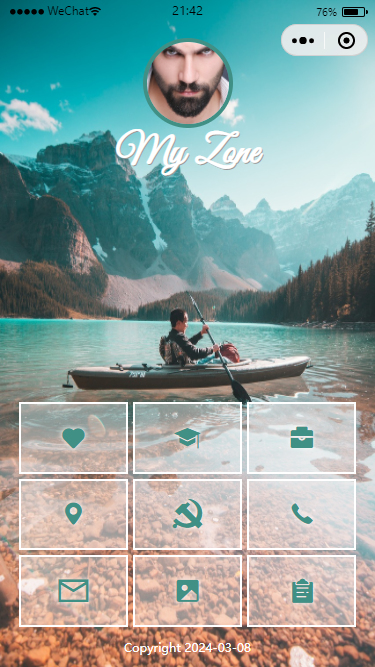
主页 home 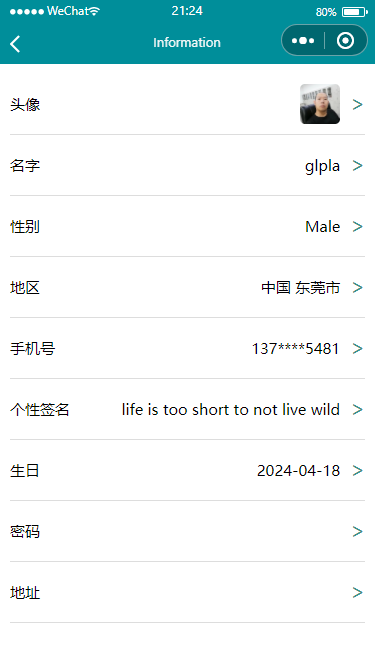
个人中心 information - 更多效果
-
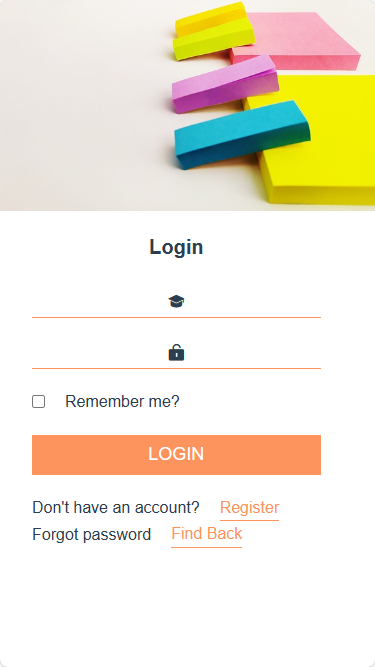
登录 login -
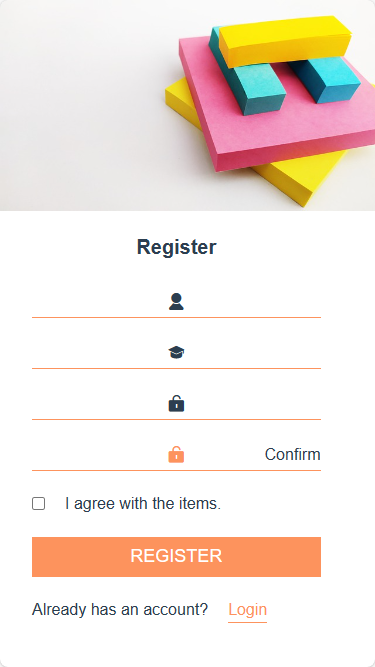
注册 register - 要求
-
按照以上步骤分别完成设计与开发规范开发;独立完成;突出个人设计特点和风格实验报告:采用学院统一下发的 实验模板 文件,以文字说明,配以必要的效果图片或核心代码,展示并说明数据来源、实施过程、各部分功能、具体内容和实现细节;最后导出为PDF,按照要求命名,提交个人学习通作业未按要求在规定时间内提交视为无效,不得分相关格式规范,请参考 论文格式规范 Paper Prettier
- 特别提示
- 实验报告除了各要素齐全外,特别要体现
-
接口文档和字段说明;其中信息字段info要体现个人信息或小组信息结构WXML - 代码逻辑js - 代码效果 - 截图,统一宽度,高度随内容、有编号、有说明标题,如:图1 页面布局

参考代码
- 用户登录
- 学号usn和密码upass匹配,登录成功
- 成功后,更新全局数据和本地存储数据
- B端
-
wx.request({ url: 'http://127.0.0.1:3000/user/login', data: e.detail.value, success: res => { console.log(res); switch (res.data.errno) { case 0: wx.showToast({ title: res.data.msg, }) // update app global data app.globalData.user = res.data.data // update local storage wx.setStorageSync('user', res.data.data) // to home wx.navigateTo({ url: '../home/home', }) default: wx.showToast({ title: res.data.msg, }) } }, fail: err => { console.log(err) wx.hideLoading() wx.showToast({ title: 'server down' }) }, complete: () => { console.log('get user done logging') wx.hideLoading() } }) - S端
- 成功后,把用户数据返回B端,以便同步
-
router.get('/login', (req, res) => { console.log('req.query', req.query); let file = fs.readFile('./public/data/' + req.query.usn + '.json', 'utf8', (err, data) => { if (err) { res.json({ "errno": 2, "msg": 'user not exist' }) } else { let jsonFile = JSON.parse(data) if (req.query.upass === jsonFile.upass) { res.json({ "errno": 0, "msg": 'login ok', "data": jsonFile }) } else { res.json({ "errno": 1, "msg": 'pass not match' }) } } }) }) - 用户注册
- B端
- 数据不能为空且同意条款和约定;验证略
-
wx.request({ url: 'http://127.0.0.1:3000/user/register', method: 'POST', data: e.detail.value, success: res => { console.log(res); switch (res.data.errno) { case 0: //update global data app.globalData.user = { usn: this.data.usn, uname: this.data.uname, upass: this.data.upass } //update local storage wx.setStorageSync('user', JSON.stringify({ usn: this.data.usn, uname: this.data.uname, upass: this.data.upass, imgUrl: 'https://cdn.pixabay.com/photo/2015/03/03/20/42/man-657869_640.jpg' })) wx.showToast({ title: res.data.msg, }) wx.navigateTo({ url: '../login/login', }) default: wx.showToast({ title: res.data.msg, }) } }, fail: err => console.log(err), complete: () => console.log('get user done logging') }) - S端
-
router.post('/register', (req, res) => { if (fs.existsSync('./public/data/' + req.body.usn + '.json')) { res.json({ "errno": 2, "msg": 'user exist' }) return; } fs.writeFile('./public/data/' + req.body.usn + '.json', JSON.stringify(req.body), (err) => { if (err) { console.log('保存文件失败') res.json({ "errno": 1, "msg": 'try later' }) } else { console.log('保存文件成功') res.json({ "errno": 0, "msg": 'register ok' }) } }) }) - 用户更新
- 指定更新的字段和值
- 可以多个数据公用一个页面
- S端
-
router.post('/modify', (req, res) => { console.log('modify', req.body); const data = JSON.parse(fs.readFileSync('./public/data/' + req.body.usn + '.json', 'utf8')); data[req.body.ukey] = req.body.uvalue fs.writeFile('./public/data/' + req.body.usn + '.json', JSON.stringify(data, null, 4), (error) => { if (error) { console.log('保存文件失败') res.json({ "errno": 2, "msg": 'try later' }) } else { console.log('保存文件成功') res.json({ "errno": 0, "msg": 'modify ok' }) } }) }) - 头像上传
- 上传的同时,更新用户数据文件
- S端
-
router.post('/avatar', upload.single('avatar'), (req, res) => { console.log('req.file', req.file); const data = JSON.parse(fs.readFileSync('./public/data/' + req.body.usn + '.json', 'utf8')); data['imgUrl'] = 'http://127.0.0.1:3000/upload/' + req.file.filename fs.writeFile('./public/data/' + req.body.usn + '.json', JSON.stringify(data, null, 4), (error) => { if (error) { console.log('保存文件失败') res.json({ "errno": 2, "msg": 'try later' }) } else { console.log('保存文件成功') res.json({ "errno": 0, // 注意:值是数字,不能是字符串 "msg": "update ok", "url": 'http://127.0.0.1:3000/upload/' + req.file.filename, // 图片 src ,必须 }) } }) }) - 上传存储配置如下
-
const storage = multer.diskStorage({
    destination: (req, file, callback) => {
        callback(null, 'public/upload');
    },
    filename: (req, file, callback) => {
        let ext = path.extname(file.originalname)
        callback(null, file.fieldname + Date.now() + ext);
    }
});